WIP might drift to talos OS
Building my own homelab as I have a spare PC, it’s been 6 years my pc have an upgrade and instead selling my old pc, I try to build homelab there are things are very repititive and let’s try to eliminate that. seem’s this homelab will try to fix those things. also this will open and learn other things.
Hardware
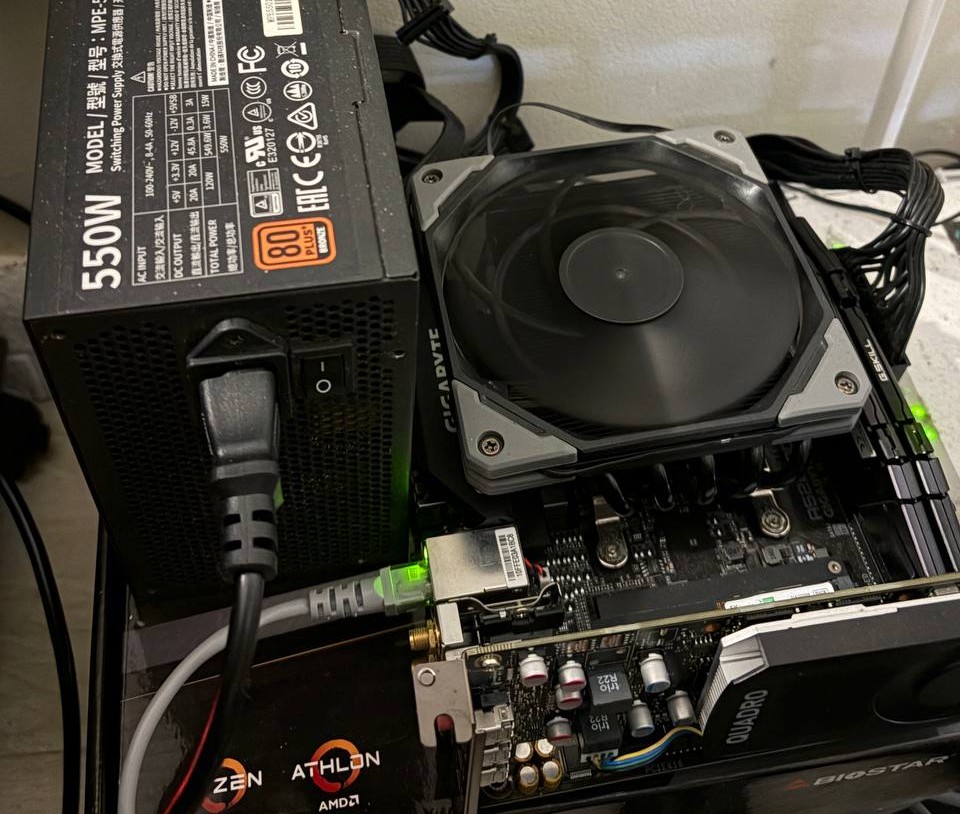
PC sepcs:
- Cpu: Ryzen 7 3700x
- Gpu: Quadro P400
- PSU: 550 watts Cpu Coolermaster
- Ram: 8 + 4 = 12gb RAM total memory
- Mobo: Gigabyte 520I AC
- SSD: SkHynix 256Gb
- HDD: 1tb drive
Will most of it are my old pc parts, some of the parts I already sold, also I left at home. I just buy a Gpu just to intiate Boot and Quardo p400 have a dedicated hardware video encoding engine, commonly known as NVENC. This will support NAS media. A Ryzen 7 3700x will be good handling multithreading task.
For this setup I use Fedora server distro, Installing is easy yo follow. Link to download download the For Intel and AMD x86_64 systems cause I’m using the Ryzen 7 3700x.
Reference: https://docs.fedoraproject.org/en-US/fedora-server/
Tools to install
When installing just use the dnf package manager.
btop- Good overview of hardware observability snapshot of my machine. which is a c lang tui.nvim- a minimal vim config only to get started with the files should I edit.tmux- A good terminal flexibility tool that allows you to manage multiple terminal sessions within a single window.git- to install necessary tools to get started and manage code.
Initial SSH Setup
The Goal is to have a Remote administration via SSH, Passwordless authentication and Key-based authentication only for secure access.
- Generate SSH Key (if needed)
ssh-keygen -t ed25519 -C "homelab"
Copy Public Key to Fedora Server machine we will use this prefered method. Preferred method:
ssh-copy-id user@server-ip
Manual fallback:
cat ~/.ssh/id_ed25519.pub
On Fedora Server:
mkdir -p ~/.ssh
chmod 700 ~/.ssh
nvim ~/.ssh/authorized_keys
chmod 600 ~/.ssh/authorized_keys
Paste public key contents into:
~/.ssh/authorized_keys
Test Passwordless SSH
From your access machine
ssh user@server-ip
2. Disable Password Authentication
- Edit SSH Configuration
sudo nvim /etc/ssh/sshd_config
Recommended settings:
PasswordAuthentication no
ChallengeResponseAuthentication no
PubkeyAuthentication yes
PermitRootLogin no
Restart ssh
sudo systemctl restart sshd
Firewall Configuration
Enable firewalld
sudo systemctl enable --now firewalld
Allow SSH Access
sudo firewall-cmd --add-service=ssh --permanent
sudo firewall-cmd --reload
Verify Firewall Rules
sudo firewall-cmd --list-all
Static IP Configuration, Identify Network Interface nmcli device status
Example:
eth0 ethernet connected
Check Connection Name
nmcli connection show
Example:
Wired connection 1
Configure Static IP
Example configuration:
sudo nmcli connection modify "Wired connection 1" \
  ipv4.addresses 192.168.1.50/24 \
  ipv4.gateway 192.168.1.1 \
  ipv4.dns "1.1.1.1 8.8.8.8" \
  ipv4.method manual
Apply configuration:
sudo nmcli connection down "Wired connection 1"
sudo nmcli connection up "Wired connection 1"
Verify IP Address
ip a
Hostname Configuration
Set Hostname
sudo hostnamectl set-hostname fedora-homelab
Verify Hostname